Choose the Right TV Wall Mount: A Simple Guide
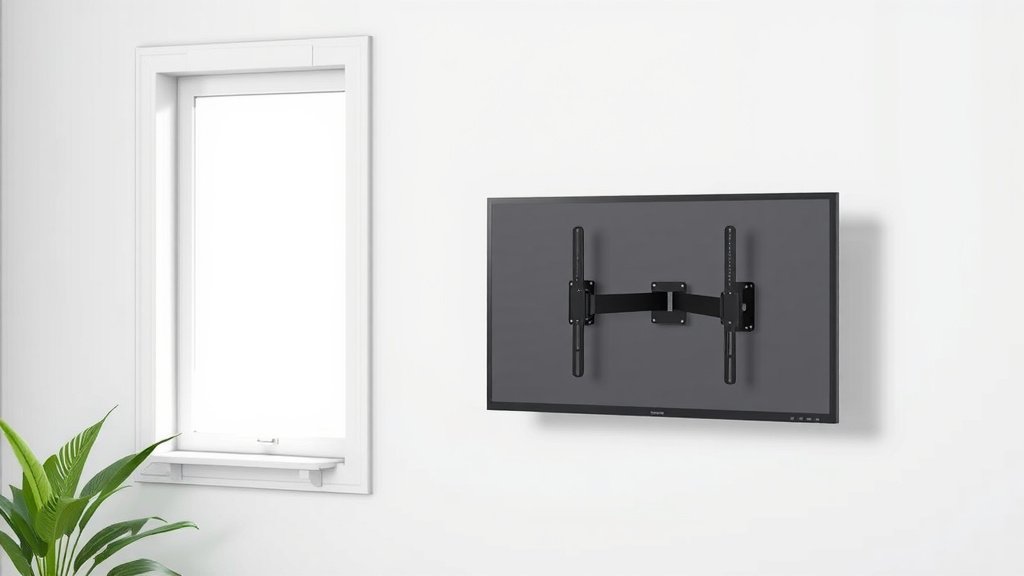
Choosing the right TV wall mount involves considering your TV’s size and weight, the type of mount you need (fixed, tilting, or full-motion), and your wall type. Ensuring compatibility is key for a secure and stable installation that keeps your TV safe.
We found that selecting a mount that can handle more weight than your TV is a smart safety measure. Think about where you want your TV to be positioned and what viewing angles you prefer. A little planning now saves a lot of headaches later, especially when dealing with larger screens. Getting the right hardware is also super important.
- Check your TV’s weight and VESA pattern.
- Match the mount’s capacity to your TV’s weight.
- Decide between fixed, tilting, or full-motion mounts.
- Confirm your wall can support the mount and TV.
Let’s walk through exactly what you need to know to pick the perfect TV wall mount for your space.
Picking the Right TV Wall Mount for Your Space
So, you’ve got a new TV or you’re finally ready to get that big screen off the entertainment center. That’s awesome! Mounting your TV can really transform your room, saving space and giving you that cinema-like feel. But with so many options out there, how do you choose the perfect mount? Don’t worry, we’re here to help you navigate the choices and make sure your TV is mounted securely and looks fantastic.
Understanding Your TV’s Specs: The Foundation of Your Mount Choice
Before you even look at mounts, you need to know a couple of things about your TV. This is the most important step for safety and compatibility. Getting this right ensures your mount will work and, more importantly, that your TV won’t end up on the floor!
Weight and Size: More Than Just Numbers
Your TV’s weight is a critical factor. Mounts have weight limits, and you absolutely must pick one that can safely support your TV. It’s always a good idea to choose a mount that can handle a bit more weight than your TV actually weighs. Think of it like a seatbelt – you want it rated for more than you need, just in case.
TV size, measured diagonally in inches, is also important for compatibility. While weight is the primary safety concern, the physical dimensions matter for how the mount will attach to your TV and how it will fit on the wall.
The VESA Pattern: Your TV’s Mounting Fingerprint
Have you ever looked at the back of your TV and seen those four screw holes? That’s the VESA pattern. VESA stands for Video Electronics Standards Association. It’s a universal standard for TV mounting hole spacing. You’ll see patterns like 200x200mm or 400x400mm. Your TV mount needs to match this pattern.
Most manufacturers use VESA standards, but it’s always best to check. You can usually find your TV’s VESA pattern in the user manual or by searching your TV model online. Many mount manufacturers will list compatible VESA patterns on their product pages.
We found that confirming the VESA pattern is a simple step that prevents a lot of frustration down the line. It’s like ensuring you have the right key before trying to open a door.
Types of TV Wall Mounts: Finding Your Perfect Angle
Once you know your TV’s specs, you can start thinking about how you want your TV to sit on the wall and how you plan to watch it. There are three main types of mounts, each offering different levels of adjustability and viewing convenience.
Fixed Mounts: Sleek and Simple
A fixed mount, as the name suggests, holds your TV flat against the wall. It’s the slimmest option, giving your TV a clean, built-in look. These are great if you plan to position your TV at eye level and won’t need to adjust the viewing angle much.
Fixed mounts are generally the most affordable and easiest to install. They’re a solid choice for primary viewing areas where you have a fixed seating position and a good line of sight to the screen. Think of it like a picture frame – it just hangs there, looking good.
Tilting Mounts: A Gentle Nod to Comfort
Tilting mounts offer a bit more flexibility. They allow you to angle your TV up or down. This is incredibly useful if you need to mount your TV higher on the wall than ideal, such as above a fireplace. The tilt helps you achieve a better viewing angle without straining your neck.
Many tilting mounts also have a low-profile design, so your TV still sits relatively close to the wall. This type of mount is a popular choice for living rooms and bedrooms where ceiling height or furniture placement might create a less-than-ideal direct viewing line. We found that the ability to adjust the tilt is a game-changer for comfort.
Full-Motion Mounts: The Ultimate in Flexibility
Full-motion mounts, also known as articulating or swing-arm mounts, offer the most versatility. They allow you to tilt, swivel, and extend your TV away from the wall. This means you can easily adjust the angle for people sitting in different spots, reduce glare by moving the TV, or even push it into a corner when not in use.
These mounts are perfect for large, open-concept rooms or if you have multiple viewing areas. They can also be a lifesaver if you need to position your TV in a corner or need to pull it out to connect cables. While they are typically the most expensive and complex to install, the viewing freedom they provide is unmatched.
Considering Your Wall Type: The Unsung Hero of Mounting
This is where many people run into trouble. Not all walls are created equal, and your mount needs to be securely fastened to the right kind of wall structure. Using the wrong hardware can lead to a mount failure.
Wood Studs: The Gold Standard
Mounting directly into wood studs is the strongest and safest method for drywall. Most wall studs are made of wood, and they provide a solid anchor point. You’ll need a stud finder to locate them accurately. Most full-motion and larger mounts require mounting to two studs for maximum stability.
When you attach the mount directly to studs, you’re essentially creating a very strong connection between your TV, the mount, and the structural integrity of your house. Many experts say this is the most reliable way to hang anything heavy (Mayo Clinic).
Metal Studs: A Different Approach
Homes built with metal studs (often found in apartments or commercial buildings) require different mounting hardware. You can’t simply screw into metal studs. You’ll need special toggle bolts or anchors designed for metal studs. It’s essential to ensure these anchors are rated for the combined weight of your TV and mount.
Concrete or Brick Walls: Specialized Needs
Mounting on concrete or brick walls requires specific anchors, like lag shields or concrete anchors. These are designed to create a secure grip in masonry. You’ll likely need a hammer drill to create the pilot holes. These walls are very strong, so if properly anchored, they can support even the largest TVs.
Drywall (Without Studs): Use with Caution and Proper Anchors
Mounting directly into drywall without hitting studs is generally not recommended for most TVs, especially larger or heavier ones. Drywall alone cannot support significant weight. If studs are absolutely impossible to locate or use, you must use heavy-duty drywall anchors specifically designed for mounting TVs. Look for anchors rated well above your TV’s weight, such as toggle bolts or molly bolts. Many guidelines point to using a mount designed for a higher weight capacity and ensuring your anchor is rated for it (Consumer Product Safety Commission).
Key Considerations for a Smooth Installation
Here’s a quick checklist to ensure you’re on the right track for picking and installing your TV mount.
- Confirm your TV’s exact weight and its VESA mounting pattern.
- Choose a mount with a weight capacity significantly higher than your TV.
- Decide if you need the flexibility of a tilting or full-motion mount.
- Identify your wall type (wood studs, metal studs, concrete, brick).
- Ensure you have the correct hardware for your specific wall type.
- Consider the location and height where you want your TV to be.
Conclusion
You’ve now got the roadmap to pick the perfect TV wall mount. Remember, your TV’s weight, VESA pattern, and your wall type are the most important factors. Understanding the differences between fixed, tilting, and full-motion mounts helps you choose the right viewing experience. By carefully checking your TV’s specifications and your wall’s structure, you ensure a secure and stable installation.
Your next step is to grab a tape measure and a stud finder. Confirm your TV’s VESA dimensions and weight, then start looking for mounts that meet these needs. Happy mounting!
Frequently Asked Questions
What is the VESA pattern, and why is it so important?
The VESA pattern refers to the standard spacing of screw holes on the back of your TV. Your mount’s VESA pattern must match your TV’s to ensure a secure connection. We found that checking this first prevents incompatible mounts from being purchased.
Can I mount a TV on a wall that doesn’t have studs?
Mounting directly into drywall without studs is generally not recommended for heavier TVs. If studs are impossible to find, you must use heavy-duty drywall anchors specifically rated for your TV’s weight. Research indicates proper anchors are essential for safety.
How much weight capacity should my TV mount have?
Always choose a mount with a weight capacity that is significantly higher than your TV’s actual weight. We recommend selecting a mount rated for at least 25% more weight than your TV. This provides an important safety margin.
Is it better to get a fixed, tilting, or full-motion mount?
The best type depends on your viewing habits and room layout. A fixed mount is sleek and simple for direct viewing. Tilting mounts are good for higher installations, while full-motion mounts offer maximum adjustability for multiple viewing angles and glare reduction.
What tools do I need to install a TV wall mount?
Basic tools often include a drill, stud finder, level, screwdriver set, and measuring tape. If you’re mounting on concrete or brick, you’ll need a hammer drill and specific masonry bits. Always check the mount’s instructions for a complete list.